Week of the 04/06/2026 - #15
Contents
tech
- Revision 2026
- Fixing audio equipment
- Putting old cellphones to good use (part 2)
Revision 2026
It’s that time of the year: Easter and with it comes Revision, the largest event of the year. I love watching the new demos and releases and here are the ones that I found most interesting:
Fantasy console
The past couple of months I worked on a game and used TIC-80 as my prototype tool for the game. I learned a bit and want to see the code for some of the demos that used that platform. Here are the ones I enjoyed the most:
- Endfield - 1st place entry. Very impressive. Used Picotron (a bifed up version of Pico-8). YouTube Pouet page
- One Of Many Lives by Syndrome. For TIC-80. Pouët page. YouTube
- You can watch the full compo here
Other compos

- Disintegration by Digimind - 256 byte MSDOS demo. YouTube
- Remoded by 7dUMP & SandS - 3rd place in Oldskool demo compo. This is a very cool MSDOS demo. YouTube
- Triplet by Otomata Labs - An awesome 32k, 2600 VCS demo. Coding for the Atari 2600 is very complicated. YouTube Pouët page
- Beyond The Pixels by Otamata Labs - A cool sub-pixel demo for the GameBoy Advance. I want to see this on real hardware. YouTube - Pouët page
- To watch all compos you can go here: YouTube All compos playlist
- Party page @Demozoo - See results, productions, and more.
Fixing audio equipment: Sony CDP-491 CD player
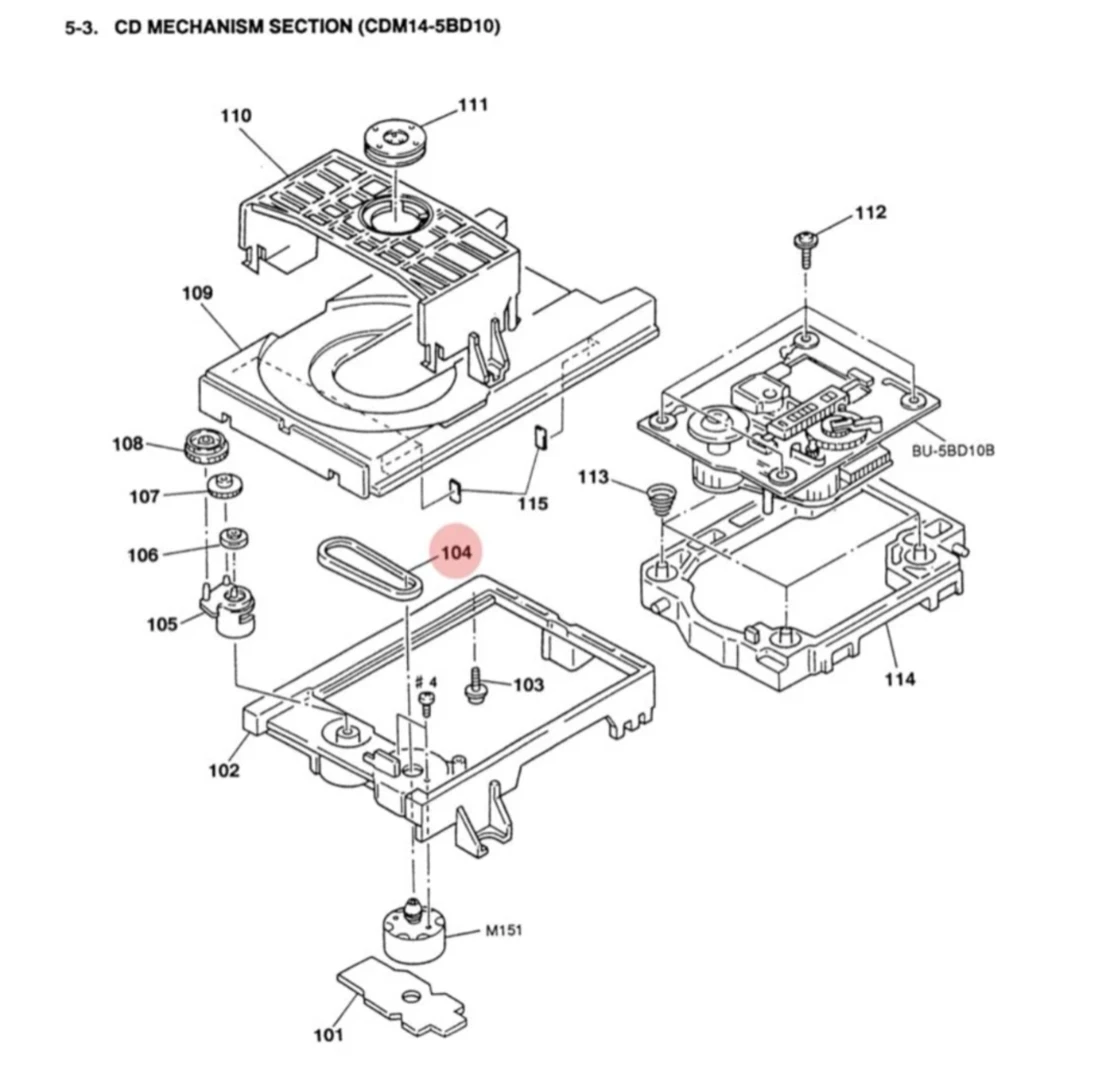
I have several vintage audio equipment that I need to fix. This weekend I started on a Japanese Sony CDP-491 CD player that I have. Initially the player wouldn’t turn on and I had incorrectly diagnosed a burnt transformer. After some measuments it became apparent that the transformer was fine but the voltages where half their expected values. It turns out the player had 110V plug but the equipment was actually 220V. Once I connected it to 220V the player would turn on but the CD tray was acting weirdly. One thing that I noticed was that the CD wasn’t closing all the way and there is a bottom part that raises the laser up to the CD. That wasn’t fully coming up. The problem seems to be the belt used by the motor is very worn out and needs replacement. This is easy to find: it’s Sony part number 4-927-649-01:
But there is yet another problem: the spindle motor does not turn. All the other motors seem to work fine except for the spindle motor. Initially I thought maybe the motor was dead but I tried connecting 3V batteries to the motor and it would turn. So there seems to be something else that is not working properly and I need to diagnose. For the moment I’m out of ideas but I wanted to write this down for the next time I try to fix this.
Links:
- Belt in eBay that needs replacment: https://www.ebay.com/itm/383519280812
- The belt is square with 1.5mm thickness and around 100mm in length. There are generic belts in Aliexpress that can be used.
- Video of a repair of a CDP-491 - This video shows the tray mechanism and how to clean it and how it works. He has issues similar to mine.
- Another video - With similar issues. Only shows how to check power supply voltages. Useful only for that.
- Another person fixing issues with their CDP-491 - Turns out this video made me realize what was happening!
- Long video on CD Player repair - A long (+1 hour) video on the topic of CD repairing and how it works. Lot’s of info and tips on this one.
- Manual for CDP-491 - This is a better version of the manual I was using.
- Manual for CDP-590 - Although not exactly my model, it is very similar but the manual has a much better quality. It uses the exact same tray mechanism (BU-5BD1)
- Thread with info regargind a CDP-195 - This thread might be useful.
UPDATE Ok, so I have it working! Turns out the spindle wasn’t starting because the laser lense was dirty. One of the videos I looked at had a similar issue which made me try a bit harder to clean the lense. I had already done it but very superficially. After a better clean with isopropyl alcohol and it started! I still probably need to change the belt but after much fiddling with it the CDs mostly load.
💡 Idea
Now that it works, I was looking at the circuit and it crossed my mind that I con hook up a microcontroller (a Pico comes to mind) to the input of the DAC to record the audio stream directly from the CD. Looking a bit in the circuit it should be straight forward to hook a couple of wires between the output of the CXD2554P digital filter (IC302, pins 15-17) and the input pins of the CXD2552Q DAC (IC305, pins 14-16).
Putting old cellphones to good use (part 2)
After going through my old cellphones I realized most of them have dead batteries which are hard to find replacements. Due to this, I decided to investigate a little on how to get them to work without the battery. Here are my findigs:
- The older models are pretty easy: they usually have ground, +3.7V and a third pin for a thermistor to measure the temperature.
- At least on the Samsung S5 (one of the models I have) you just need to connect a 10k ohm resistor between that pin and ground and connect the +3.7V and ground to the other two pins and you should be good to go.
- For power you have two choices: you can connect a USB power supply with a dc-dc step down converter. These are basically small circuits which take as input any voltage between 5V - 24V and you can regulate with a potentiometer the output voltage.
- Another good alternative is to use a 16850 battery which is 3.7V
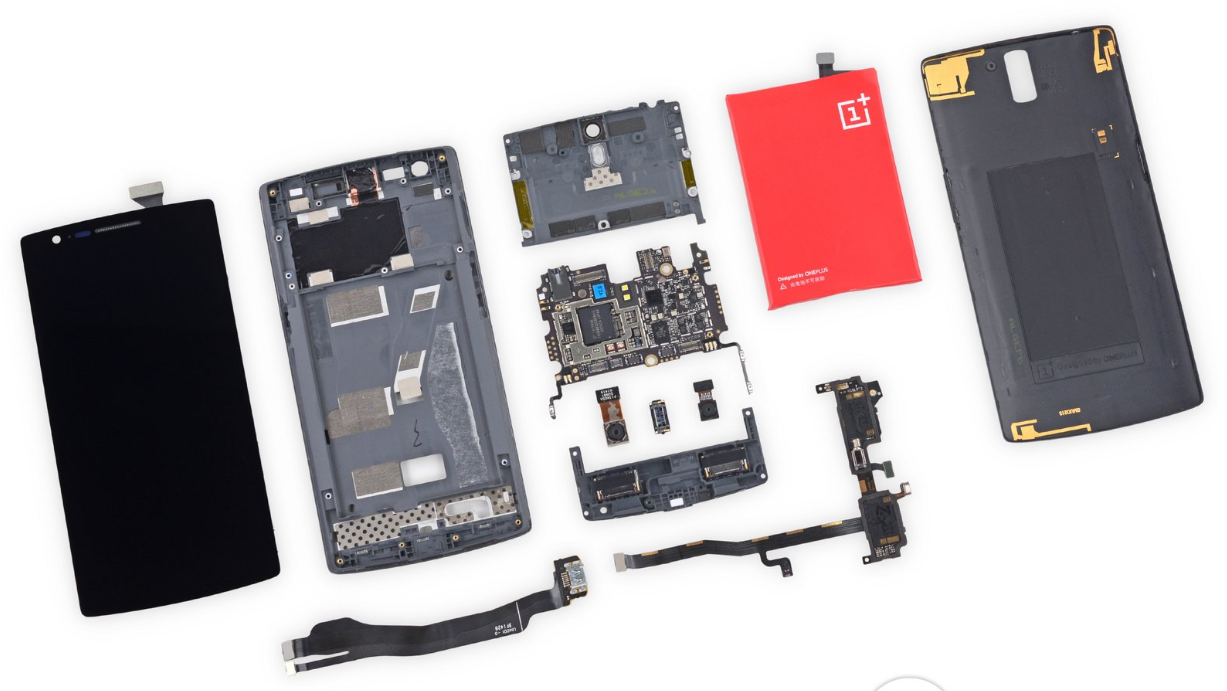
- Newer cellphones are more complicated. I have an original Oneplus One. This model, turns out that it not only has +/- but also a chip which communicates with the cellphone over i2c to report the battery status and other info.
- For the Oneplus One, the idea is two disassemble the battery and connect the battery cell to a 16850 (for example or other battery) and then connect the attachment to the cellphone.
Links
- Thread on powering old cellphones without battery - Lot’s of comments and the source of the information above.
- Oneplus One teardown - A tear down of my Oneplus One
- I2C communication protocol of a smarphone battery - A great article describing how the Oneplus One communicates with the battery.
- Samsung S5 Dummy Battery - A nice article on how to create a dummy battery for the Samsung S5
💡 Idea
I have a Oneplus One which is pretty simple to disassemble and separate the display, charging port and main board. I am thinking of tearing it appart and trying to see if I can get it to boot with only these 3 things: motherboard, display and charging port. I also have two displays. One is completely shattered so I want to see if I can remove the glass and use the display itself. Aparently you can install Ubuntu Touch on a Oneplus One! See here.